How to Place a Bet Before the Round Starts
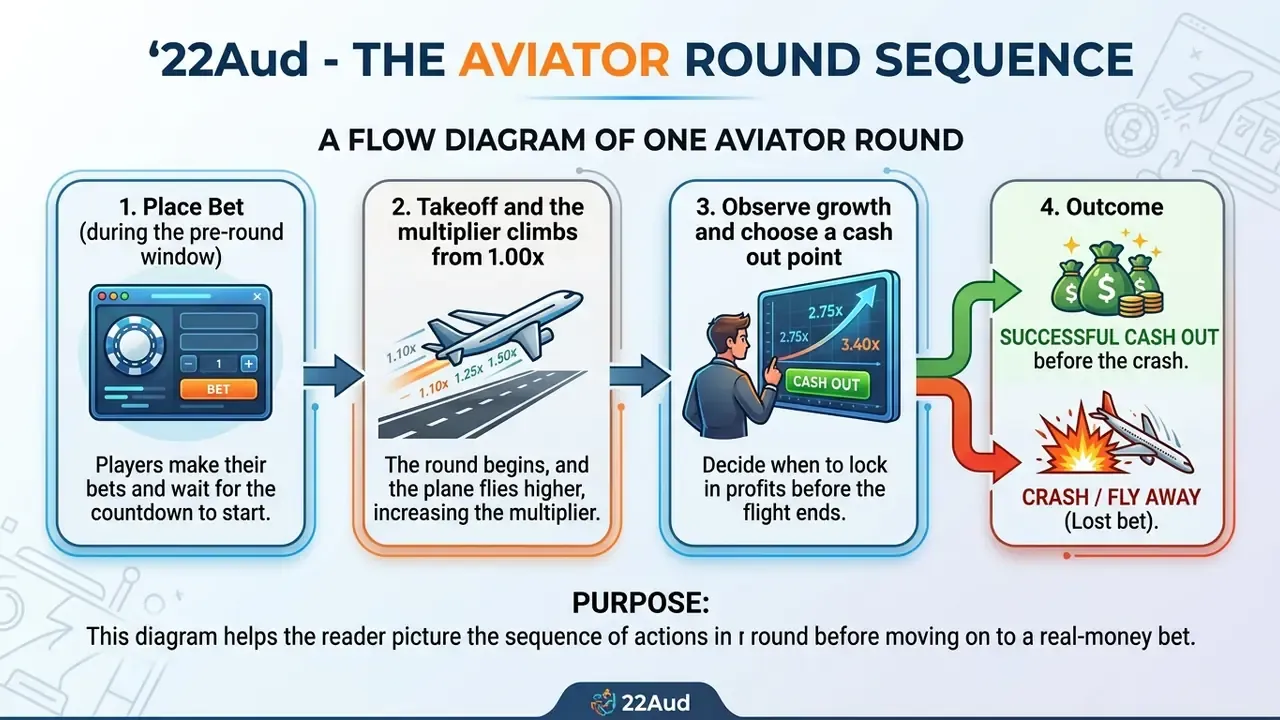
To place a bet in Aviator, choose your stake with the panel controls below the main display while the "Next Round" countdown is running. Aviator lets you place a single bet or two independent bets on the same round.
Each bet panel works on its own, so you can set different stake amounts and target different cash out points. Once the preparation window closes, the plane takes off, active wagers lock in, and nothing can be adjusted until the next preparation phase.
If a round is already in progress when you open the game, just wait for the plane to fly away. Bets are only accepted during the pause that follows each round.
Configuring automated betting (Auto Play) properly. In the Auto tab, define exact risk-stop parameters instead of leaving the system running unattended. Most builds allow between 10 and 100 automated rounds, with three programmatic stop triggers:
- Stop if cash decreases by: halts auto-play once your session bankroll drops by a pre-set amount. This is your hard loss limit, and it should always be set.
- Stop if cash increases by: locks in profit and ends the automated loop as soon as your target session gain arrives.
- Stop if a single win exceeds: pauses execution when one high-multiplier payout lands, so a large win is not recycled straight back into the next rounds.
Auto Cash Out is a separate toggle. You nominate a multiplier at which the stake is withdrawn automatically, capped in most builds at 100x. It removes reaction-time error. It does not change the probability of reaching your chosen target, and no setting ever will.
The side menu also shows other participants' bets and wins across "All Bets", "My Bets" and "Top" tabs, while the hamburger menu holds rules, bet limits, betting history, sound settings and the Provably Fair verification tool. Treat that statistics panel as decoration. It has no predictive value whatsoever.